Theory you can play.Right at the keys.
Sound Theory listens as you play and shows you the theory behind it: the chord you're on, where it could go next, and practice that makes it stick.
- Nothing to install, no sign-up
- USB or Bluetooth MIDI keyboards
- No MIDI? It listens through the mic
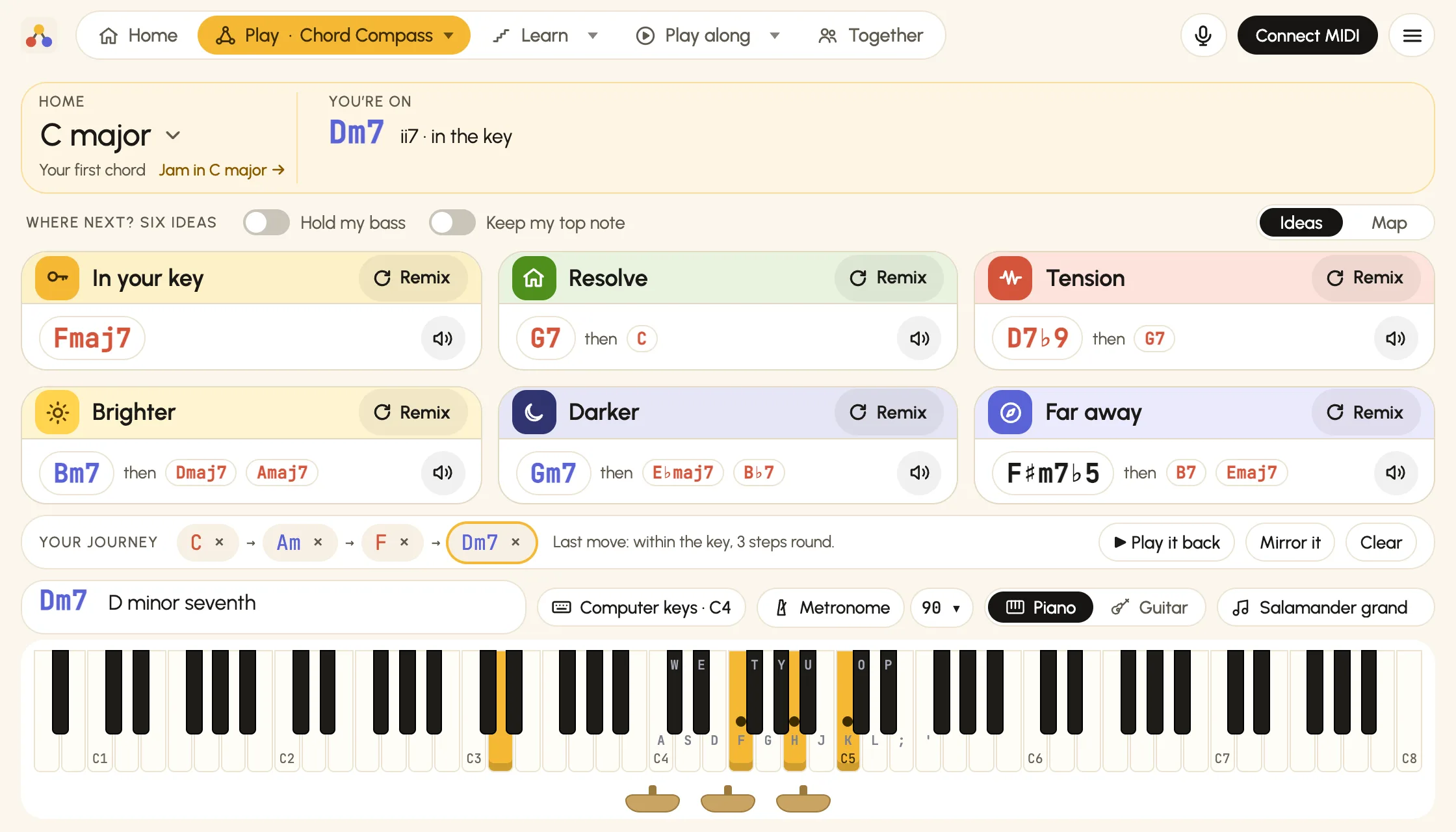
Chord Compass
Play a chord. Get six ways to go next.
Stuck on the same four chords? Play any chord and Chord Compass offers somewhere to go in each direction, ready to try on your keys, with the theory named as you go.
You play C in C major
In your key
IVmaj7Fmaj7
The next step in the usual flow.
Resolve
V7 → IG7 then C
A way home.
Tension
passing °7C♯dim7 then Dm7
A chord that leans into the next.
Brighter
IIIE
Sharps come in: a third up, the sun comes out.
Darker
♭VImaj7A♭maj7 then D♭maj7 B♭m7
Flats come in: the sun goes in.
Far away
I+Caug then E
Out of the key, one small step at a time.
- Hold my bass keeps the note you're holding under every idea.
- Keep my top note keeps your melody on top.
- Home is your first chord, or the key you choose, and every idea is worked out from it.
- Map shows the same six ideas round the circle of fifths, each in its key's colour.
- Family puts your key's seven chords in a ring, a fourth apart: go round it and you're playing a progression.
- Spice adds colour to the chord you're on: notes on top, each with the mood it brings, and a stack that shows every note's job.
- Your journey builds as you go: play it back, or mirror it to hear it turned upside down.
What it does
Play, learn and follow along
Everything follows your keyboard, or your guitar through the microphone, as you play. The bar at the top of the app has Home and three groups: Play, Learn and Play along, where you'll also find Together. New in Play: Modes, the seven moods of the major scale from bright to dark, each with four chords to play over.
See your chords on the circle of fifths
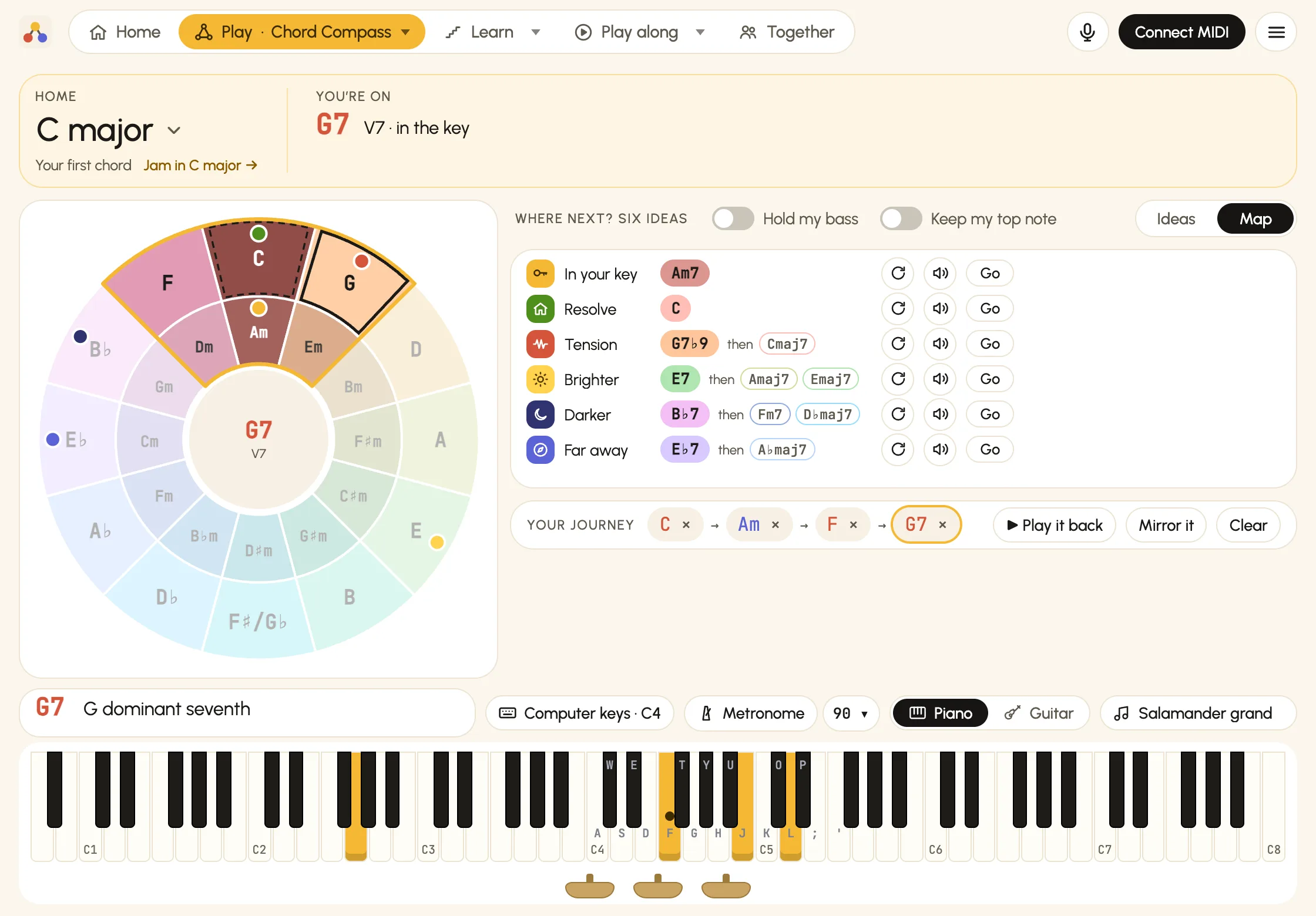
Switch Chord Compass to its Map and your playing appears on the circle of fifths: every key in its own colour, home's key in a gold window, and your chords shaded from first to newest. The six ideas sit on the circle as coloured dots, so you can see which way each one goes.
- Home is your first chord, or the key you choose: tap it, then any key on the circle, major or minor. When your playing settles in another key, it offers to make that one home.
- Brighter heads round toward the sharps, Darker toward the flats, and Resolve back into home's window.
- Tap an idea to go there, or its speaker to hear it first, its chords lit on the circle. Start one and it waits in its row for you to carry on.
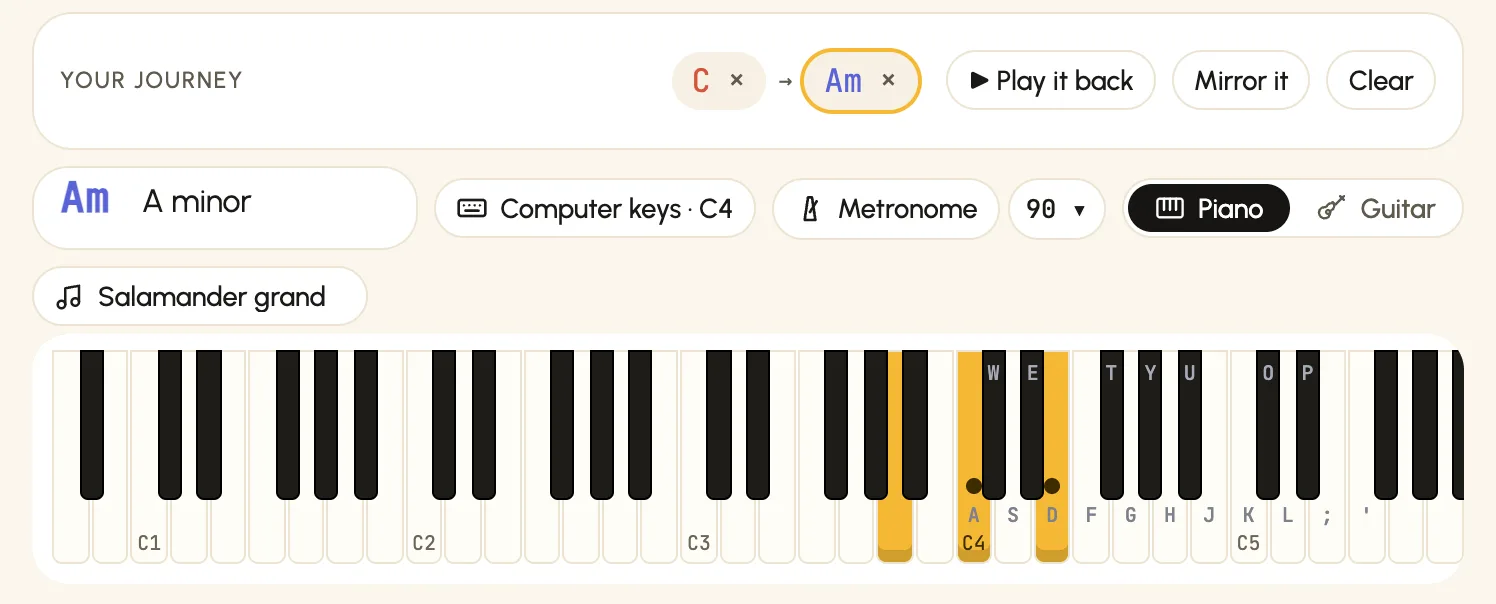
See which notes stay put
Play one chord after another and the notes carried over from the chord before get a dot on their keys: from C to A minor, C and E stay. Keep those fingers still and move only the rest.
- The chord you play is named in full, and nothing more, so the line never gets in the way.
- It works for every chord it names: sevenths and ninths, diminished and half-diminished.
- Guitarists see the kept notes on the fretboard too.
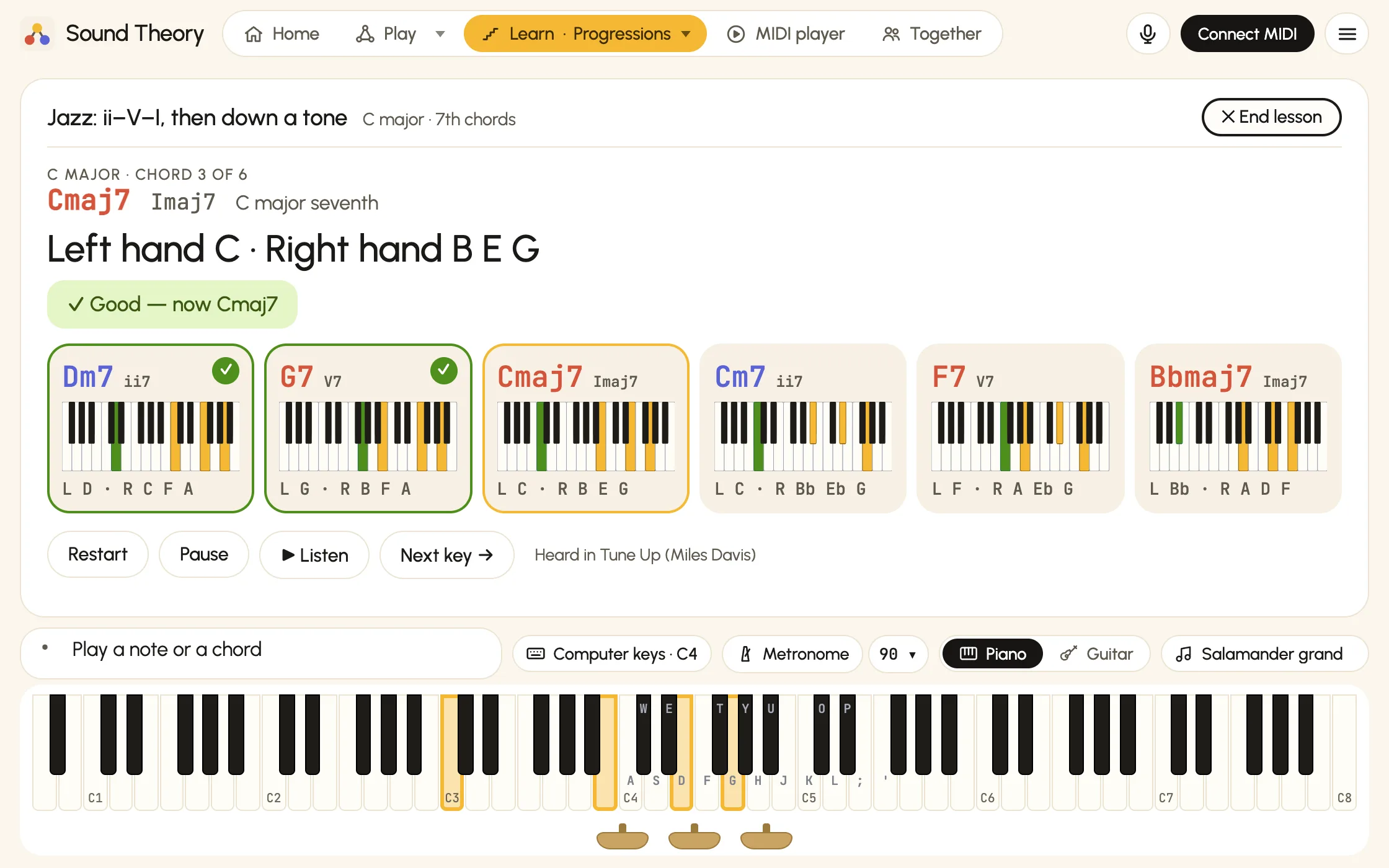
Progressions and 7th chords in all 12 keys
Pick a progression, from the pop I–V–vi–IV to the jazz ii–V–I in major and minor, and play it key after key round the circle of fifths. Start with the shapes shown, then play it from memory.
- 7th chords with jazz-style two-hand shapes: left hand on the root, right hand moving as little as possible from chord to chord.
- Round and round until you stop: one key over and over, or all 12 in order or shuffled, with a tick for every chord you get right. Play in time with the metronome if you like.
- Clear lessons: the start screen says what you'll play, then what to play is the headline, big and clear. Click a chord card to hear it and play it next; rest the mouse on one to see it on the keyboard.
- Also under Learn: inversions and smooth voicing, scales with proper fingering, sight-reading, and a chord quiz. Each progression names famous songs that use it.
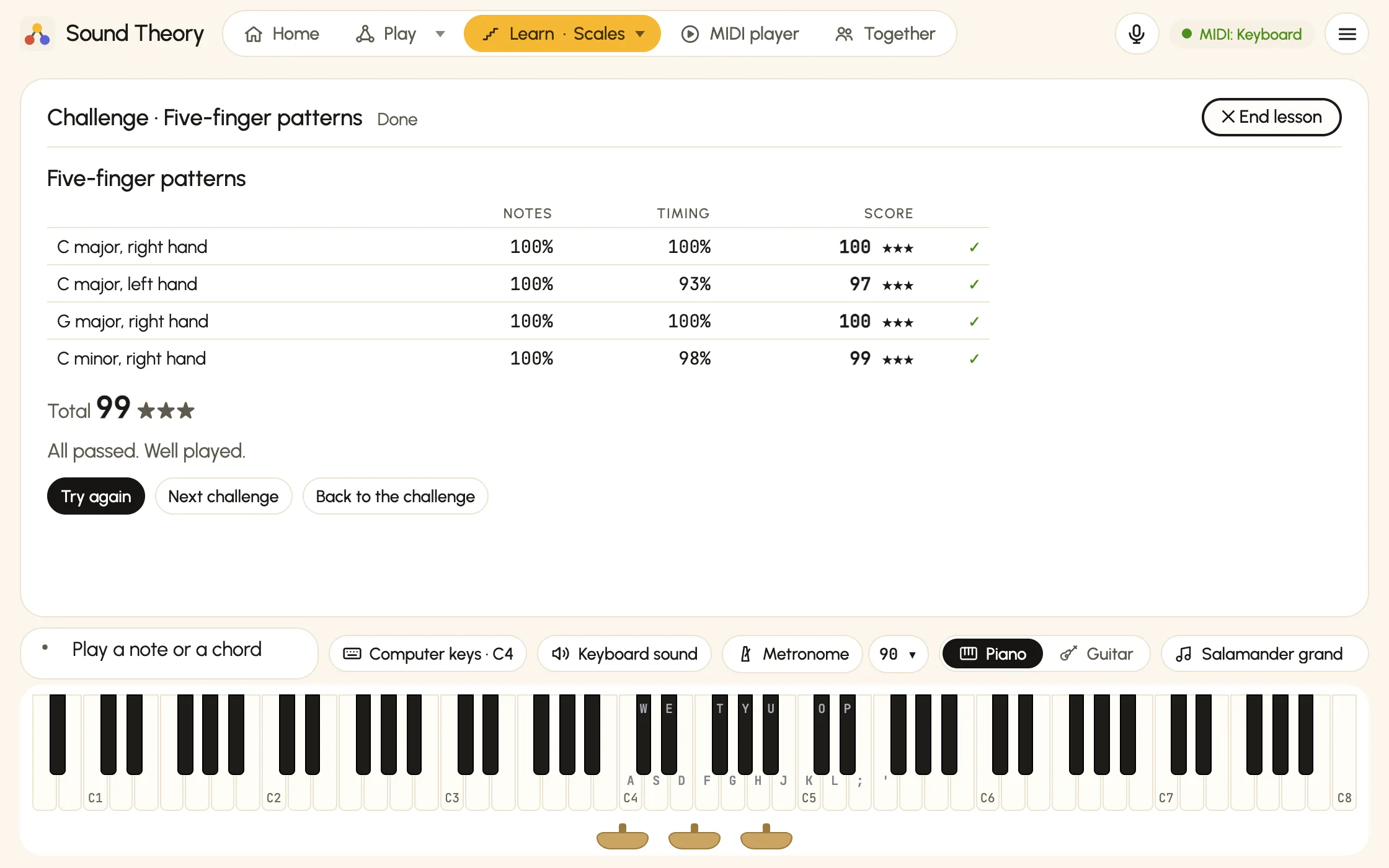
Challenges that score your timing
Every trainer opens on a home like Songs': what to practise today, then its challenges as cards. Challenges are short sets, from five-finger patterns to the minor ii–V–i and hearing how a phrase ends, played in time after a count-in. Each one scores your notes and your timing, with up to three stars.
- In time, everywhere: scales, inversions, progressions and sight-reading can all play to the metronome, with a meter that shows whether each note landed early or late.
- A friendly judge: about 80 ms either side counts as good, looser at slow tempos, and the summary tells you if you tend to rush or drag.
- Check my timing: tap along with eight clicks, and timed practice allows for your speakers and your reactions.
- All open: try any set, and the next one you haven't passed is suggested. Your best and last scores stay on this device.
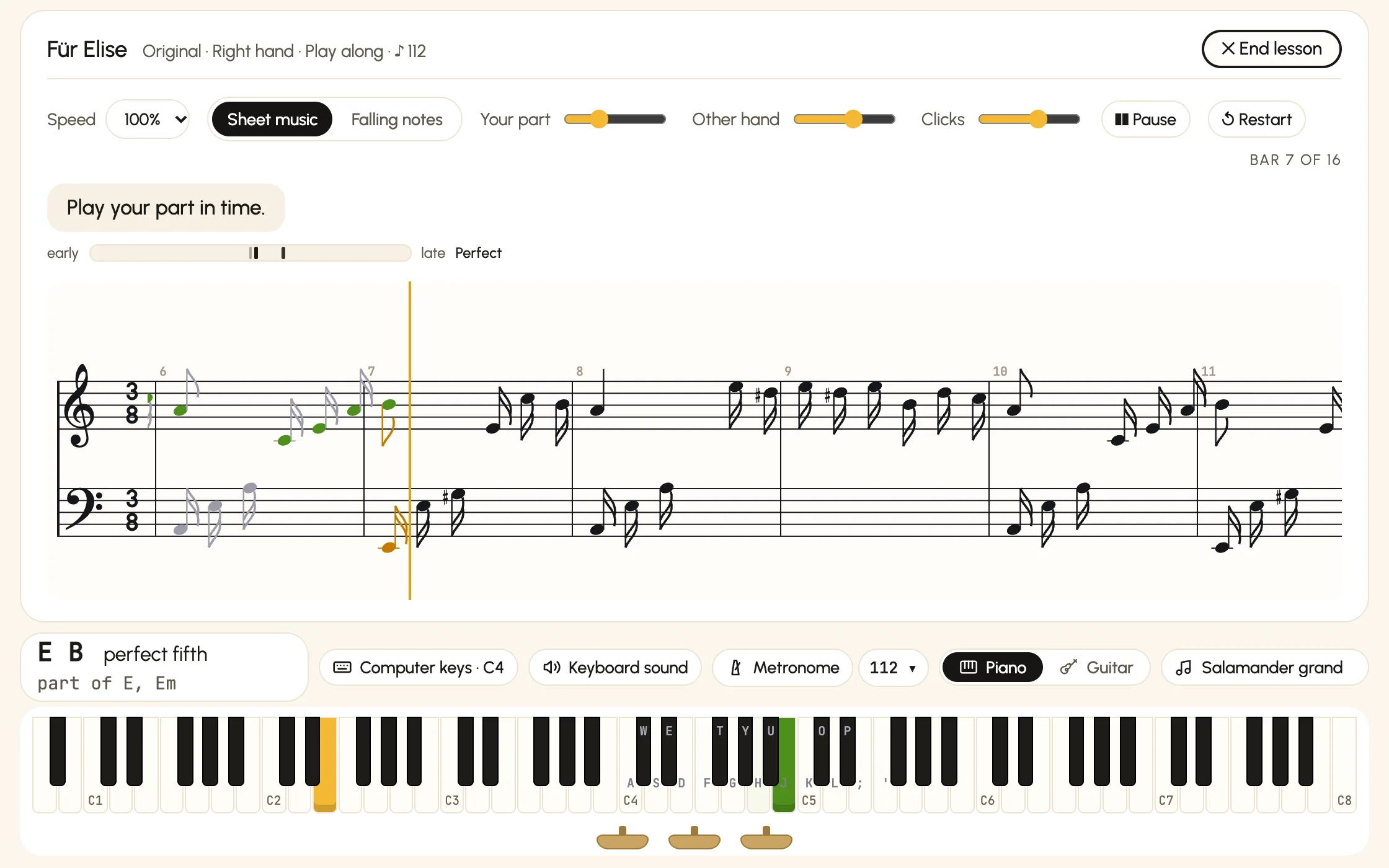
Play along to real pieces
Ode to Joy, Für Elise, Gymnopédie No. 1 and The Entertainer, each in an easy arrangement and one close to the original. Play one hand while Sound Theory plays the other, then see how you did.
- Sheet music or falling notes: read the score as it scrolls past, or watch the notes fall onto the keys.
- A report at the end: notes and timing, a score with stars, whether you rushed or dragged, and the bars to practise.
- Wait for me when you're learning it: the music waits for each note. Slow it down, or listen first.
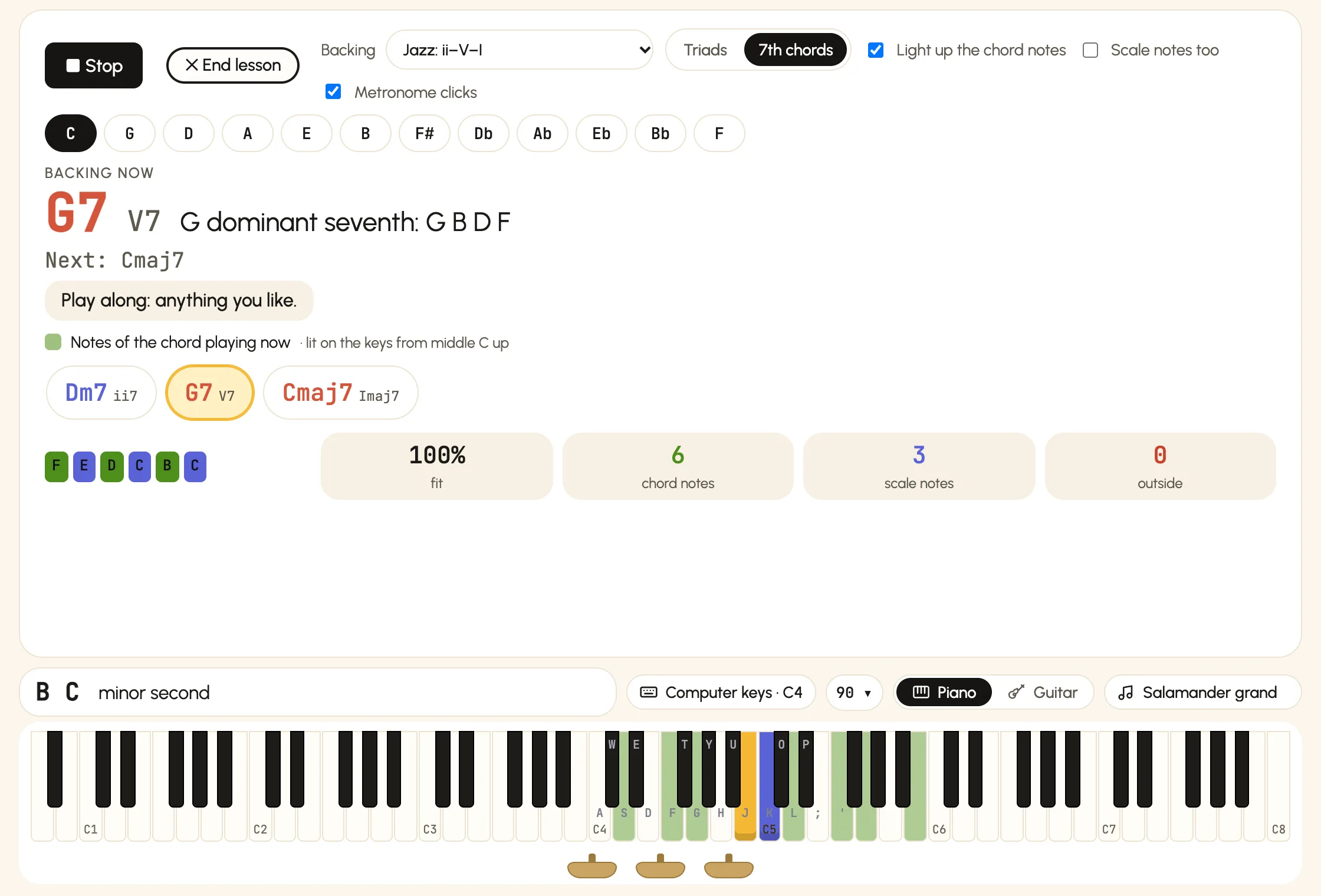
Jam over a backing track
Pick a backing and a key, press Start jamming, and play anything you like. The notes that fit light up: green for the chord playing now, violet for the scale.
- Every note you play is marked as a chord note, a scale note or outside, with a running score.
- Jazz backings play with 7th chords, and you can change key on the fly.
- Turn the hints off when you'd rather use your ears, or learn the chords first in Learn → Progressions.
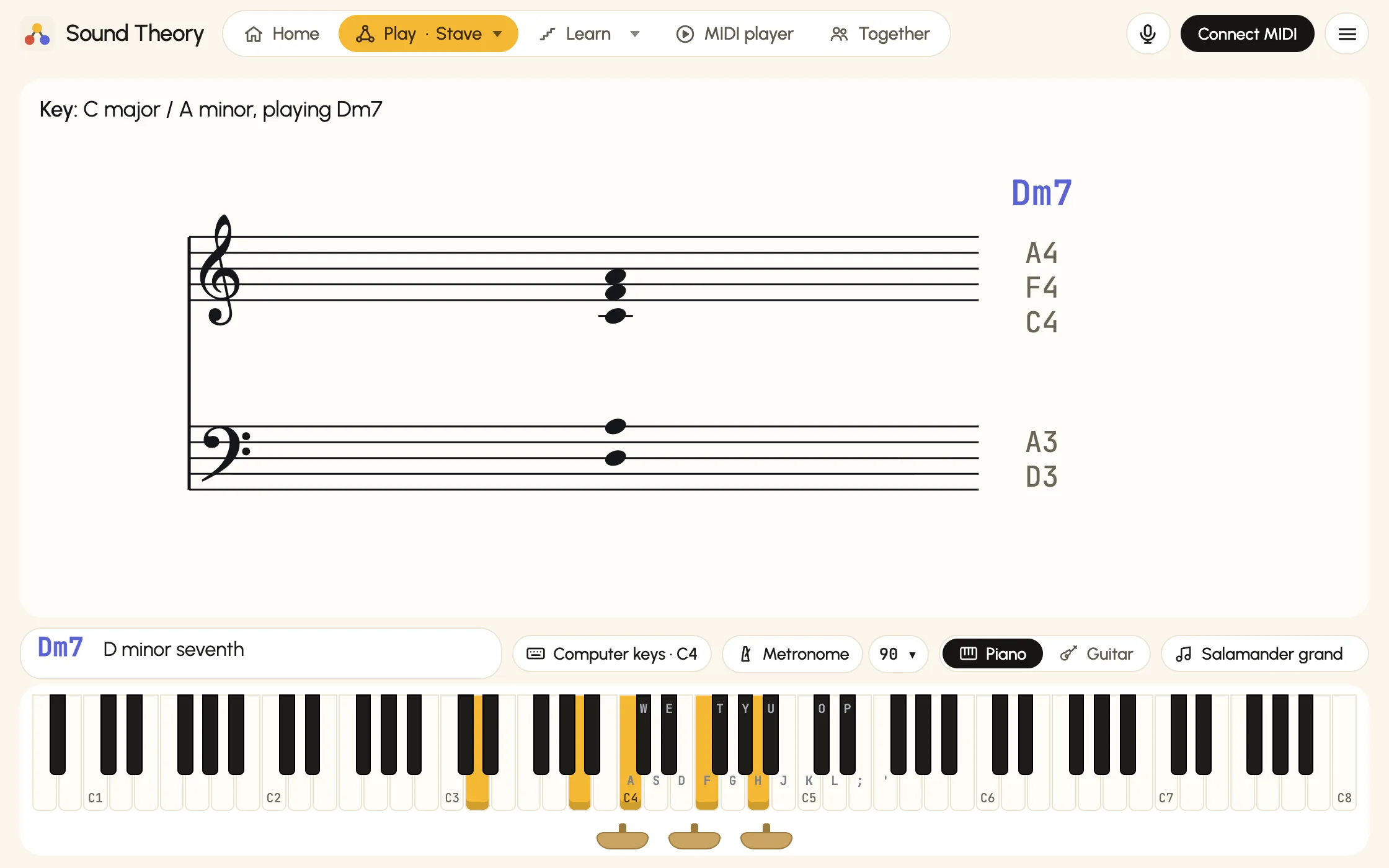
Read the notes as you play them
Every note you play appears on a grand staff, treble and bass, with its name beside it and the chord above. Sharps and flats are spelled to suit the key you seem to be in.
- Recognises sevenths, ninths, elevenths, thirteenths, sus and altered chords, and inversions such as C/E.
- A good way to connect what your hands do with what's written on the page.
Record, replay and learn songs
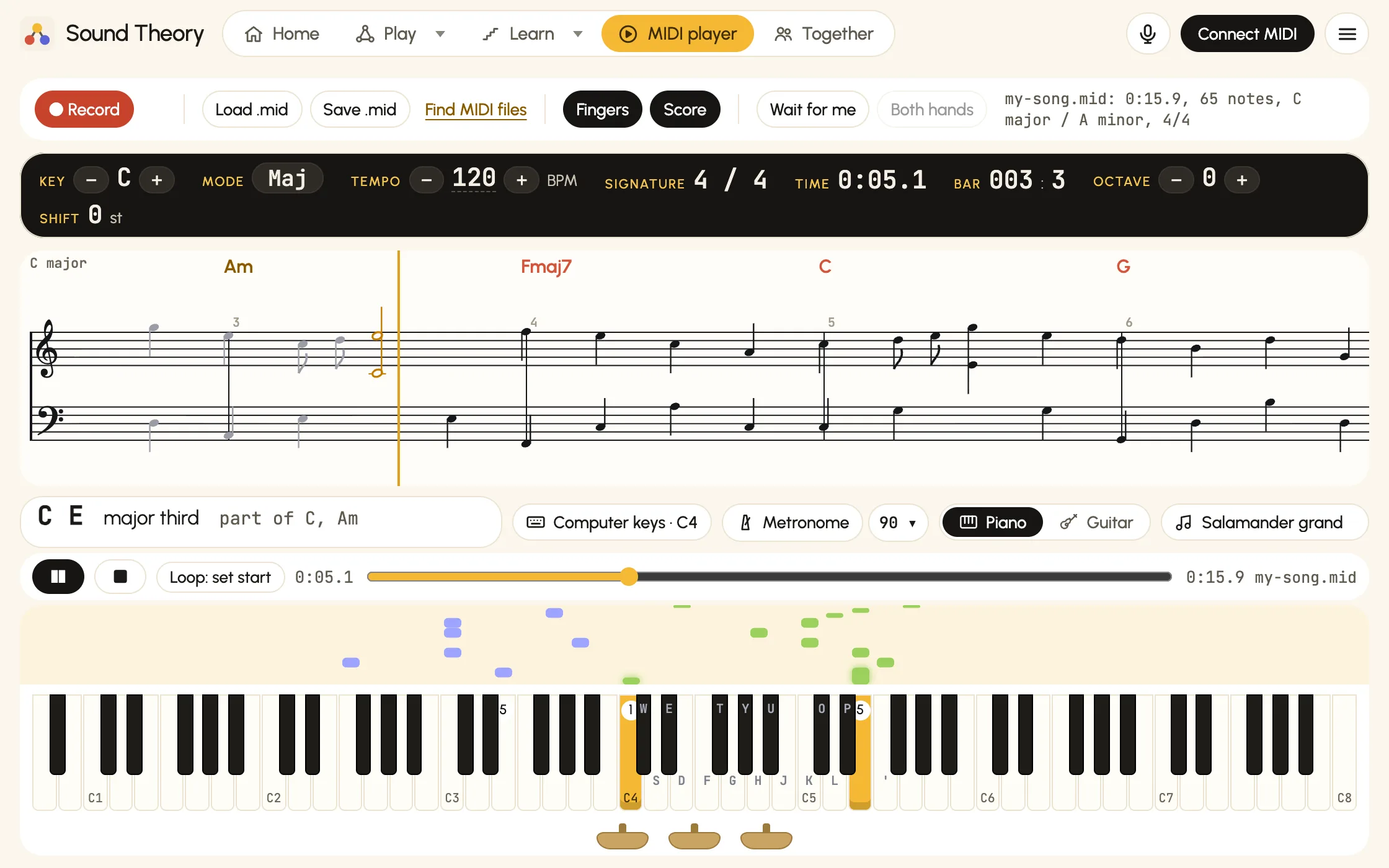
Record yourself, or load any MIDI file. Notes fall towards the keys so you can see what's coming, with a scrolling score and the chord names above it, bar by bar.
- Suggested finger numbers on the keys and falling notes.
- Change the key, tempo and octave to slow a piece down or move it somewhere comfortable.
- Wait for me: the song pauses until you play your notes, for either hand or both, while the other hand plays along.
- Loop a few bars to practise a tricky passage, and save recordings as MIDI files.
Play guitar? It listens, and shows the fretboard
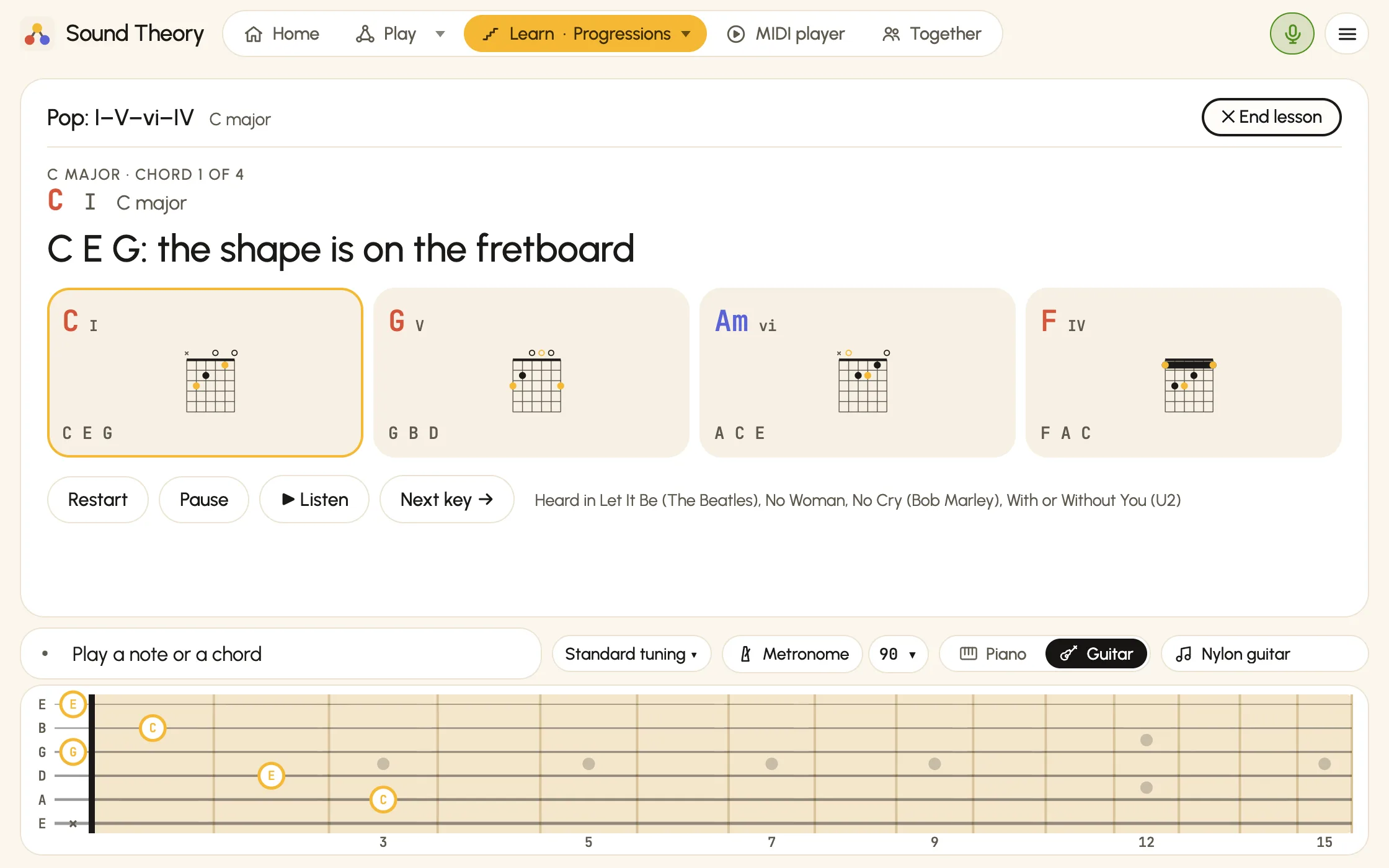
Choose Guitar and Listen with the mic when the app opens, and the piano gives way to a fretboard. Strum a chord and Sound Theory names it and shows its shape on the neck.
- Progressions show the shape to play on the fretboard, and Improvise lights up the notes that fit all along the neck.
- Any tuning, with or without a capo: standard, Drop D, DADGAD, open tunings or your own. Shapes and the fretboard follow your strings, and with a capo chords are named both ways, such as "F (C shape, capo 5)".
- Scales and sight-reading listen for single notes, in any octave.
And also
Small things that make practice nicer
Play together
Send your session link to a friend, teacher or student, or list your session so anyone can join. Everyone's notes light up in their own colour, the chord name and stave follow you all, and you can chat as you play.
More than 70 sounds
A sampled Yamaha grand, Rhodes, organs, strings, choirs, synths and more. A few built-in sounds work offline too.
Guitar or acoustic piano? Use the mic
No MIDI needed: Sound Theory listens through your microphone and names the chords and notes you play. Guitarists get a fretboard that shows each chord's shape.
No keyboard? Tap along
Click or tap the on-screen piano, or tap chords in Chord Compass and on its circle of fifths to hear them. On a phone, play your instrument to the mic, or tap chords and listen.
Your playing stays with you
Everything happens on your device. Your notes only leave it when you choose to play together, and they're never stored.
Light or dark
Follows your device, or pick light or dark yourself. Sound Theory remembers your choice.
Chord quiz
Test yourself: play the chord it names, name the chord you hear, or hear a phrase and say how it ends: finished or not, which cadence, a modern or a medieval minor. Relaxed or against the clock, with ten-question challenges.
Metronome with count-in
Steady clicks at any tempo, with a one-bar count-in before timed practice, timed quizzes and songs in the MIDI player.
Scales, inversions and sight-reading
Scales with proper fingering, inversions and smooth voicing, and reading notes on the treble, bass or grand staff, each with easy, medium and hard levels. Play them in time, or try the challenges: broken chords, arpeggios, contrary motion and Hanon too.
Who it's for
For players ready to build on what they know
Sound Theory isn't a first lesson. It's for people who can already find their way round the keys and play a few chords, and want to understand what they're playing and take it further.
Self-taught players
You play songs by ear or from chord sheets, on piano or guitar. See the name of every chord you play, the key you're in, and the moves that would sound good next.
Returning players
Played years ago and coming back to it? Rebuild your chords key by key, with scales, inversions and sight-reading to get hands and eyes working together again.
Songwriters and improvisers
Stuck on the same four chords? Chord Compass suggests moves from safe to surprising, and Improvise lets you try ideas over a backing track.
Teachers
For students past the basics: show how chords connect one note at a time, set progressions to work through in every key, or teach at a distance in a shared session.
Get started
Up and running in a minute
Open it in your browser
Chrome or Edge on a computer, or Chrome on Android, for MIDI keyboards. The microphone works in any modern browser, iPhone and iPad included. There's nothing to install and no account to make, and you can add it to your home screen to open it like an app.
Connect your keyboard, or use the mic
Plug in with a USB cable or pair over Bluetooth, then press Connect MIDI and choose Allow. Playing a guitar or an acoustic piano? Choose Listen with the mic instead.
Play a chord
Sound Theory names the chord, shows it on the keys and the stave, and suggests where to go next.
No keyboard to hand? Open it anyway: let it listen through the mic, or tap the on-screen piano and chords.
Questions
Good to know
I'm a complete beginner. Is it for me?
It's made for players who already know their way round the keyboard and can play a few chords. You don't need to read music or know any theory, because Sound Theory names everything as you go, but it isn't a course in where to put your fingers for the first time. If you're starting from scratch, use it alongside a teacher or a beginner course: the chord quiz and the easy levels are a gentle way in.
Do I need a MIDI keyboard?
No. It can listen through your microphone to a guitar, an acoustic piano or any other instrument. You can also use the on-screen piano with a mouse or by touch, tap the chords Chord Compass suggests, or load a MIDI file and watch it play. On a phone there's no on-screen piano: play your instrument to the mic, or tap chords and listen. A real keyboard makes it much more fun, though, because you can play whole chords at once.
Can it listen to my guitar or acoustic piano?
Yes. Choose Listen with the mic when the app opens (or later from Play with…), choose Allow, and say whether you're playing a guitar, a piano or something else. Strum or play, and Sound Theory names the chord, lights it on the piano, says what changed from the chord before and suggests where to go next. The trainers work too: Progressions and Improvise take strummed chords, and Scales and Sight-reading take single notes. Choose Guitar and the piano becomes a fretboard showing each chord's shape. Set your tuning and capo (standard, Drop D, DADGAD, open tunings or your own) with the tuning button that shows in guitar mode. The mic hears which notes are sounding, not which strings, so the fretboard shows its best guess at where you're playing them. The mic hears which notes are sounding but not exactly how a chord is spread, so it's best with major and minor chords, 7ths, sus, diminished and augmented chords. It stops listening while the app itself plays a sound, unless you tick that you're wearing headphones.
Can I play with someone else?
Yes. Open Together under Play along, press Start session and send the link. Whoever opens it is asked whether they'd like to join, and lands straight in the session. Up to 8 people can play at once, each in their own colour, and the chord name and stave follow everyone's notes together. Turn on List in Open sessions to let anyone join, with a name and a tag such as Jam or Beginners welcome: it then shows under Open sessions, with how many people are playing. Everyone in a session can chat; messages are filtered, the host can remove people, and each player can hide anyone's messages. Anyone can go back to playing on their own at any time.
Which browsers does it work in?
Chrome and Edge on a computer work best, and Chrome on Android works too. Firefox works once you allow its MIDI permission. Safari, and every browser on iPhone and iPad, can't connect to MIDI keyboards, but they can listen through the microphone, and the on-screen piano works on a computer or an iPad. Phones show no on-screen piano: you play your instrument and Sound Theory follows.
Is there an app for iPad and iPhone?
It's on its way. A Sound Theory app for iPad and iPhone is in testing now, and isn't in the App Store yet. It's the same Sound Theory as the one in your browser, and it's being built to connect to MIDI keyboards too, by cable or Bluetooth. Until then, open Sound Theory in Safari and add it to your home screen. There's no Android app yet; Chrome on Android connects to MIDI keyboards already.
Does it work with Bluetooth keyboards?
Yes. Pair the keyboard with your computer first (on a Mac, through Audio MIDI Setup), then press Connect MIDI in the app. The app has step-by-step instructions for both Bluetooth and cable. If Bluetooth gives you trouble, a USB cable is the most reliable option.
Where can I find MIDI files?
Free libraries have thousands, from classical piano collections such as the Classical Piano Midi Page and the Mutopia Project to pop and game tunes on BitMidi and VGMusic. Download a file, then press Load a MIDI file in the MIDI player.
Which chords does it recognise?
Major and minor chords, plus sevenths, sixths, ninths, elevenths, thirteenths, 6/9, sus, altered chords such as 7♭9 and 7♯9, diminished and augmented chords, in any octave and any inversion (it shows inversions as, for example, C/E). Through the microphone it recognises single notes and the commonest chords: major, minor, 7ths, sus, diminished and augmented. It also says what each change keeps and moves, and names cadences as you play them.
Is my playing recorded or uploaded?
No. Everything happens on your device. If you use the microphone, the sound is analysed on your device as you play and is never recorded or sent anywhere. Recording only starts when you press Record, and a recording only leaves the app if you save it as a MIDI file to your own device. If you choose to play together, the notes you play and any chat messages pass through dannyhearn.me live so the others get them, but they're never stored. A session you list publicly shows its name, player count, colours and your name in Open sessions. If you send feedback, your message (and your email, if you give one) goes privately to Danny. Apart from that, the app only downloads its fonts and instrument sounds, and it counts visits and which features get used, through Google Analytics and through its own anonymous totals (no cookies, no IP addresses kept, and never what you play).
Does it cost anything?
No. Sound Theory is free to use, with no account needed.